


CarRx by Elo GPS
4.652.00 Reviews
App Specs
- Version
- 3.3.4
- Updated On
- License
- Free
- Downloads
- 10,000+
- Developer
- Connected Dealer Services, LLC
- Categories
- Auto & Vehicles
- Platform
- Android
Screenshots
 Analysis by AppCompare
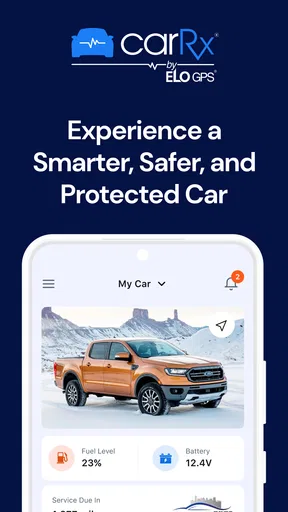
I approached CarRx as a practical car companion rather than another flashy driving app, and that distinction matters. Its promise is simple: make vehicle ownership smarter, safer, and more protected through a phone-based experience. In my view, that makes it most interesting for drivers who want a clearer connection between everyday car use and the services surrounding their vehicle, not for someone looking for navigation, fuel-price hunting, or a full mechanical encyclopedia.
CarRx is an Auto & Vehicles app from Connected Dealer Services, LLC. It is free to use, carries an Everyone age rating, and has built a respectable reputation with a 4.7 average from around 300 ratings. The app has passed 10 thousand installs, which gives it enough real-world adoption to feel established without making it seem like a universal household tool.
My overall view is that CarRx works best as a focused ownership assistant. It can help bring vehicle-related information and protection into one place, but its value depends heavily on what kind of support your car and dealer relationship provide. That is both its strongest quality and its main limitation: when the surrounding service fits, the app feels useful; when it does not, the experience can feel narrower than a general-purpose automotive app.
What CarRx is really useful for
The first thing I noticed is that CarRx is built around reducing the distance between a driver and the support structure behind a vehicle. Many drivers use separate tools for reminders, roadside help, service communication, vehicle protection, and basic ownership records. That fragmentation is manageable until something goes wrong. Then the question becomes less “Which app has the most features?” and more “Where do I go first?”
CarRx tries to answer that question with a single vehicle-focused destination. I found that approach more valuable in stressful situations than during an ordinary commute. When everything is working, a car app can feel optional. When a warning appears, the car will not start, or a driver needs assistance away from home, having a familiar place for vehicle support can be more reassuring than searching through old emails or trying to remember which number to call.
The app’s emphasis on being smarter, safer, and protected also gives it a different identity from a typical navigation or traffic application. It is not trying to replace a map app on a long trip. It is aimed at the ownership side of driving, where maintenance, protection, and support matter over weeks and months rather than only during one journey.
That focus makes the app easier to recommend to people who recently bought a vehicle, rely on their car for work, or share driving responsibilities with family members. It can serve as a central reference point instead of leaving important vehicle-related tasks scattered across a glovebox, dealership paperwork, text messages, and several unrelated apps.
Worth Reading Before You Choose

EA SPORTS FC Mobile 26 Is a Bigger Football Game, but It Takes Time

Flipboard Shows What News Apps Must Do Beyond the Feed

Switching to Android Auto Means Rethinking Your Driving Routine

Google Calendar Makes a Crowded Week Easier to Manage

Ludo King Makes the Most of the Minutes Between Plans

Baby Panda World Brings Quick Play to Modern Phones, but Its Game Library Feels Busy
A realistic day-to-day scenario
Imagine a driver leaving work late on a rainy evening and noticing that the car is behaving differently. The immediate problem may not require a mechanic, but the driver still needs to decide whether to continue, arrange help, or contact the people responsible for the vehicle’s protection. This is where a focused app such as CarRx can be more practical than opening a general search engine and sorting through unrelated results.
I would use it before a trip as well, especially when the journey is important and the vehicle has recently shown an issue. Checking the available ownership and protection information in advance is a small habit, but it can prevent a frantic search after a problem occurs. The useful insight here is that the app’s best moment may be before an emergency, when you can learn where relevant support is located and make sure the vehicle information you need is easy to reach.
For families, the same idea applies in a slightly different way. A parent may not be the person driving the car when assistance is needed. A teenager, partner, or visiting relative may be the one standing beside the vehicle. In that situation, an organized vehicle-support app can reduce the need to explain everything from memory. I would still make sure every regular driver knows how to access the relevant information, because an app only helps if the person holding the phone can use it quickly.
Where it stands apart from usual alternatives
The usual alternatives fall into separate groups. A navigation app is excellent at directions but is not designed to organize vehicle protection. A maintenance reminder tool may help track service intervals but usually does not feel like a complete support channel. A dealership’s website may contain useful information, yet a mobile app can be easier to reach when a driver is away from a computer. CarRx sits closer to the ownership-support side of that comparison.
That does not mean it replaces every other tool. I would still keep a dependable navigation app for routes, a phone contact for urgent assistance, and the vehicle manual for model-specific instructions. The advantage is concentration: CarRx can reduce the number of places I need to check for car-related support. The trade-off is that it may not satisfy someone who expects a broad dashboard of live driving data, detailed repair education, or independent comparisons between service providers.
This is an important distinction before installing it. The app is not automatically better than a collection of specialized tools simply because it combines vehicle-related support. Its appeal comes from convenience and context. If your priority is one reliable place for ownership assistance, it makes sense. If your priority is technical diagnosis or route planning, a different category of app will likely serve you better.
The practical strengths I would notice first
One strength is the app’s clear audience. CarRx is not trying to be a social network for drivers or a game-like reward system. Its identity is tied to the car itself and the protection around that car. That narrow purpose can make an app easier to return to because I know why it is installed.
Another strength is the potential reduction in decision-making during an inconvenient moment. A vehicle problem already creates uncertainty. Removing even one layer of searching can help. My advice is to open the app while you are calm, not only when you are stranded. Review its available sections, confirm that your vehicle-related details are presented correctly, and learn the path to assistance. This preparation is more valuable than treating the app as something to download and forget.
I also like the fact that it is free. There is no purchase decision standing between a driver and the chance to test whether the app fits their ownership routine. That makes experimentation reasonable, particularly for someone who has recently changed vehicles or wants to simplify a collection of automotive tools.
Its accessibility is another positive. With support for Android devices running version 7.0 or later and an Everyone rating, it is not positioned as an app limited to the newest phones or a narrow age group. A current version of 3.3.4 suggests that the product is being maintained as an active application rather than left untouched after launch. I would still judge the experience by how well it fits my vehicle situation, because compatibility in the store is not the same as usefulness in every ownership context.
The limitation that deserves attention
The main weakness is not that CarRx is too complicated; it is that its usefulness can be conditional. A vehicle-support app cannot create a complete ownership experience by itself. The quality of what I can do inside it depends on the vehicle information, protection arrangements, and service relationship connected to my situation. If those connections are incomplete or unfamiliar, the app may feel more like a doorway than a complete solution.
That creates a setup question that every new user should answer early: does the app recognize the vehicle and support path I actually need? I would not wait until a breakdown to find out. Install it at home, explore the available information, and check whether it reflects the car you drive. If the app presents only limited assistance for your circumstances, it may still be worth keeping as a reference, but I would not depend on it as my only emergency plan.
There is also a trade-off between simplicity and depth. A focused interface can be easier for ordinary drivers, but it may not provide the detailed explanations that mechanically curious owners want. Someone who enjoys reading diagnostic codes, comparing repair estimates, recording every service item, or researching parts may prefer a dedicated maintenance or repair app. CarRx is more appealing to the driver who wants support organized around the vehicle, not to the hobbyist building a complete digital workshop.
Another point is habit. Any automotive app can become irrelevant if it is opened only once. CarRx is most useful when the driver treats it as part of vehicle preparation: review it after acquiring a car, revisit it before longer travel, and keep its information familiar for anyone else who may drive. Without that habit, the app’s protective role is easy to overlook until the least convenient moment.
Who should install it
I would recommend CarRx first to drivers who want a straightforward ownership companion and do not enjoy managing several disconnected automotive services. It is particularly suitable for people who value reassurance more than technical detail: commuters, families with shared vehicles, newer car owners, and anyone who wants vehicle support available from a phone rather than buried in paperwork.
It can also make sense for drivers who are not confident dealing with vehicle problems. The app will not turn someone into a mechanic, and I would never treat a phone screen as a substitute for professional judgment when a car is unsafe. Still, having a defined place to begin can reduce hesitation. The best use is to combine it with sensible driving decisions: stop when the vehicle appears unsafe, seek qualified help, and use the app to organize the next step instead of trying to solve every issue alone.
People who share a car should think about access before they need it. If only one person knows how the app works, its usefulness is limited when another driver has the problem. I would show regular drivers where the relevant support information is found and discuss what to do if the phone is unavailable. This is a small but non-obvious advantage of preparing early: the app becomes part of a household plan rather than a private tool known to one owner.
I would be more cautious recommending it to a driver who wants one application to handle everything. If your ideal tool includes turn-by-turn navigation, fuel tracking, deep maintenance logging, repair tutorials, insurance comparison, and extensive trip planning, CarRx is unlikely to be the right single choice. Its focused design is a benefit only when that focus matches your priorities.
I would also hesitate if you prefer completely independent automotive services and do not want an experience connected to a dealer or vehicle-support arrangement. In that case, a neutral maintenance tracker or general roadside service app may feel more flexible. The better option depends on whether you value an integrated path for your car or the freedom to assemble separate tools yourself.
How I would make the app more useful
My first tip is to set it up before leaving on a long drive. Do not merely install it and assume it is ready. Open each relevant area, understand what kind of vehicle support is available, and make a mental note of the route to assistance. This takes little effort and turns a vague promise of protection into something you can actually use.
My second tip is to treat it as a companion to, not a replacement for, basic vehicle preparation. Keep the car’s manual accessible, know where essential documents are stored, and make sure regular drivers understand what to do in an emergency. CarRx can centralize support, but it cannot compensate for an uncharged phone, an unsafe vehicle, or a driver who does not know when to stop.
My third tip is to evaluate it after a real ownership task rather than after a quick first impression. For example, see how easily you can find the information you would need before service or assistance. Ask yourself whether the app reduces searching or adds another layer. That test is more meaningful than judging it only by appearance, because the app’s value lies in the speed and clarity of its ownership workflow.
Finally, I would keep a backup route to help. Even if CarRx becomes my preferred starting point, I would retain the relevant phone numbers and know how to seek assistance through ordinary channels. This is not a criticism unique to the app; it is sensible planning for any digital service. A protection tool is strongest when it supports good preparation rather than becoming the only thing a driver trusts.
My final recommendation
CarRx is a sensible free app for drivers who want vehicle ownership support gathered into one focused mobile experience. Connected Dealer Services, LLC has chosen a practical direction: rather than competing directly with navigation or entertainment tools, the app concentrates on making the relationship between driver, vehicle, and protection easier to manage.
In my experience, its strongest case is convenience before and during an ownership problem. Its weakest point is that the experience may feel limited when a driver expects independent technical tools or a universal automotive dashboard. That is a fair trade-off, but it means users should check the app’s fit early and keep realistic expectations about what a vehicle-support app can do.
With its free price, Everyone rating, broad Android compatibility from version 7.0 onward, and current version 3.3.4, trying it is low-risk for an eligible driver. The app has been available since December 6, 2023, and its 4.7 average from around 300 ratings indicates a generally positive reception. I would not choose it as my only automotive tool, but I would recommend CarRx to anyone who wants a calmer, more organized starting point for vehicle support.
If that describes you, install it when you have time to explore it properly, prepare it before you need help, and judge it by one simple question: does it make your car easier to manage when ordinary driving stops being ordinary? For the right owner, that focused usefulness is enough to make it worth keeping.
Pros
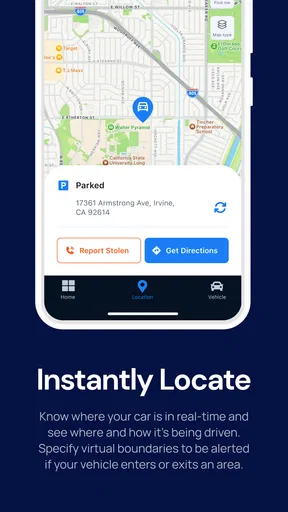
- Tracks vehicle location and trips with reliable GPS data.
- Helps monitor driving habits and vehicle usage remotely.
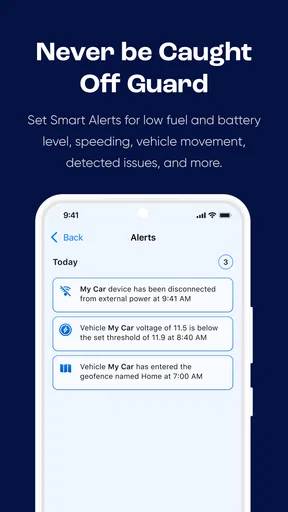
- Useful alerts can notify you about movement or unexpected activity.
- Supports better fleet oversight for families and small businesses.
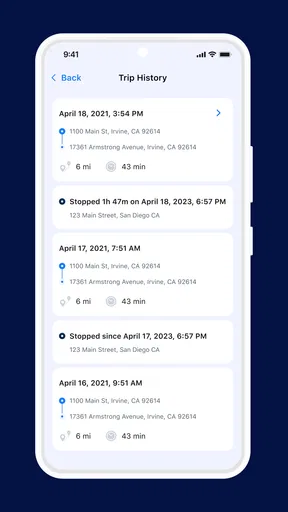
- Trip history can simplify mileage reviews and activity tracking.
Cons
- Requires compatible Elo GPS hardware to provide full functionality.
- Ongoing device or service fees may be required after installation.
- GPS accuracy can decrease in tunnels
- garages
- or poor-signal areas.
- Background tracking may increase battery and mobile data usage.
- Some features may depend on your vehicle model and subscription plan.
FAQs for CarRx by Elo GPS
What is CarRx by Elo GPS, and what does it do?
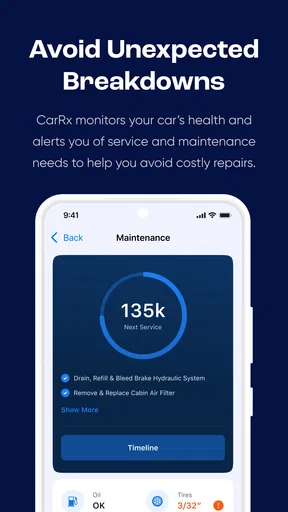
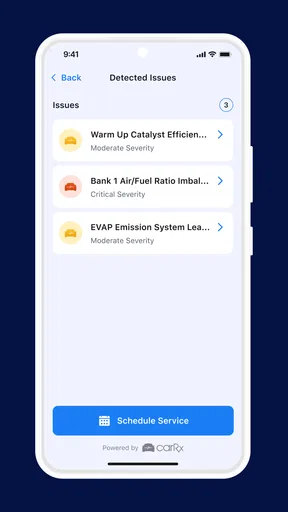
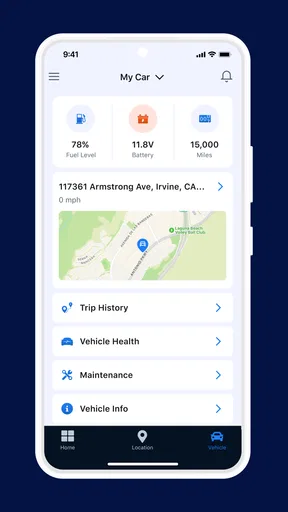
CarRx by Elo GPS is a vehicle-focused application designed to work with compatible Elo GPS services or hardware. It may help users access vehicle information, tracking features, diagnostics, maintenance-related details, or account tools, depending on the connected product and subscription. Before downloading, check whether your vehicle, GPS device, region, and service plan are supported, because the app’s available functions can vary between users.
Do I need an Elo GPS device or subscription to use CarRx?
In most cases, CarRx is intended to accompany an Elo GPS vehicle service rather than operate as a completely independent application. Some features may require a compatible tracking unit, an activated account, or a paid subscription. Installation alone may not provide access to vehicle data. Review the provider’s requirements carefully and confirm that your device has been registered and linked to the correct account before expecting tracking or diagnostic information.
Does CarRx track my vehicle in real time?
The availability and accuracy of live vehicle tracking depend on the Elo GPS equipment installed in the vehicle, the selected service plan, mobile-network coverage, GPS reception, and the app’s current connection to the provider. Location updates may be delayed in garages, underground areas, remote regions, or places with weak cellular coverage. Users should also review privacy settings and local regulations before enabling location monitoring.
Is CarRx by Elo GPS free to download and use?
The application may be available to download without an upfront charge, but some functions can depend on an Elo GPS account, compatible hardware, or a recurring service subscription. Costs may therefore come from the connected vehicle service rather than the app itself. Before signing up, check the official pricing, activation fees, renewal terms, cancellation policy, and whether any optional features require additional payment.
What should I check if CarRx does not show my vehicle or updated information?
First, verify that you are using the correct login details and that your vehicle or Elo GPS device has been properly activated and assigned to your account. Confirm that the device has power, GPS reception, and cellular connectivity, then close and reopen the app or install any available update. If information remains missing or delayed, contact Elo GPS support, since the issue may involve account provisioning, hardware, or network coverage.


